
Visas & permits · 6 min read
Track visa and residence-permit dates without losing the legal context
Track permits and travel authorizations alongside the dates that matter.
One date. A clearer plan.
At a glance
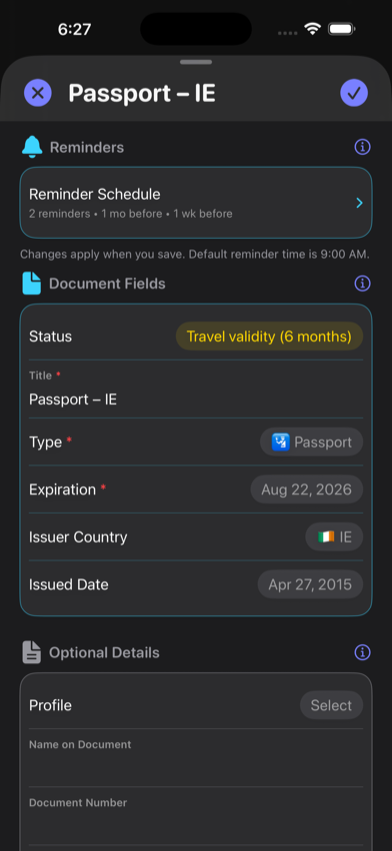
Create a separate RenewalKit record for each visa, residence permit, work permit, or travel authorization, copy the official expiration date exactly, and set reminders around the issuing authority’s current process. RenewalKit can organize and remind; it cannot determine legal status, extensions, grace periods, or the right to travel or work.
Immigration documents often have similar-looking dates with very different meanings. A calm reminder system begins by naming each record clearly and preserving the distinction between issue, expiration, travel, and application dates.
Set it up in RenewalKit
Identify the exact record
Choose Visa, Residence Permit, Work Permit, Permanent Residence Card, or Travel Authorization. Do not combine several permissions into one generic date.
Use the official expiration field
Read the physical document or official portal. If the status is electronic, manual entry may be more reliable than scanning a printout or screenshot.
Use a descriptive title
Include a practical label such as “Residence Permit — Japan” or “Work Visa — Germany.” RenewalKit stores an issuer country but not a legal interpretation of the status.
Set reminders from the real process
Check the issuing authority’s current renewal window, appointment requirements, and processing times, then choose lead times that leave room to act.
Close the loop after a decision
When a replacement is issued, update or add the new record and archive the old one. If an application is pending, keep external proof and official communications outside RenewalKit.
What to verify
Expiration may not equal loss of status
Extensions, pending applications, grace periods, and status rules are jurisdiction-specific. RenewalKit does not model them.
Travel and residence can use different rules
A document that supports residence may not be sufficient for re-entry, transit, work, or boarding. Check every relevant authority.
Do not treat OCR as authoritative
Machine recognition can confuse issue dates, “valid from” dates, and expiration dates. Confirm against the official source.
Troubleshooting
The document has no printed expiration date.
Do not invent one. Consult the official digital record or issuing authority and use manual entry only when you have an authoritative date.
OCR selected the “valid from” date.
Correct the expiration field before saving and add the issue date separately if useful.
The permit was extended automatically.
RenewalKit cannot infer the extension. Update the record only from official confirmation and retain the authority’s proof in the location it requires.
Questions
Can RenewalKit tell me whether my immigration status is valid?
No. It stores a date and reminders. Only the relevant government authority or qualified adviser can interpret status.
Does RenewalKit connect to government immigration portals?
No. Enter or scan the date and confirm it yourself; the app does not monitor an application or portal.
Can I separate permits for family members?
Yes, when Profiles is available under your entitlement. Profiles group records locally; they do not create accounts for or share data with each person.
Will RenewalKit renew a visa or residence permit?
No. It does not submit forms, book appointments, pay fees, or contact an authority.
Sources & further reading
- RenewalKit on the App Store
Current supported product framing; legal requirements must come from the relevant authority.
- Apple — Scheduling a Notification Locally
How iOS local notification scheduling works.