
Family & profiles · 6 min read
Build a family expiration timeline without mixing everyone’s records
Use Profiles to keep household documents organized by person on your device.
Together. Organized.
At a glance
Create one Profile for each person you help, add a separate record for every document, assign it to the right Profile, and review the filtered timeline regularly. Profiles are local organization labels—not accounts or a family-sharing service—and require the Profiles entitlement, lifetime Unlimited, or Upgrade to Unlimited.
Household tracking works best when every date has one owner, one document type, and one source. Profiles add that separation while keeping the underlying reminders in the same RenewalKit installation.
Set it up in RenewalKit
Confirm Profiles access
Profiles is a standalone add-on and is bundled with lifetime Unlimited and Upgrade to Unlimited. Current monthly and yearly subscriptions provide unlimited capacity but do not themselves grant Profiles.
Create a simple profile label
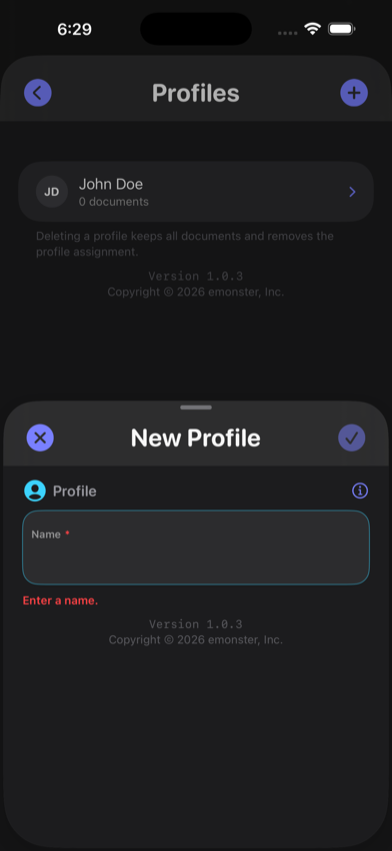
Open Settings, choose Create Profile, and use the name you need to identify the person. Remember that profile names are stored data.
Add each document separately
Create distinct records for a child’s passport, a partner’s license, a parent’s residence card, and so on. Confirm the date from each physical or official source.
Assign and filter
Choose the matching Profile on each record, then use the profile filter on the Documents screen to review one person’s timeline.
Review as a household
Periodically scan the full timeline for dates that need long lead times. After renewal, update or archive the old record so an expired date does not stay actionable.
What to verify
Each document keeps its own jurisdictional rules
Grouping dates under a Profile does not change the renewal, validity, travel, or identity requirements set by each document’s issuing country or authority. Check the current official source for every record.
Profiles do not share data
A profile does not create a login, invite the person, or synchronize with another person’s Apple Account.
One Apple Account boundary
Optional iCloud sync uses the Apple Account and CloudKit configuration on the device. Do not describe it as family sharing.
Names are saved information
Profile display names and optional names on documents are stored locally and can sync through iCloud if enabled.
Troubleshooting
The Profiles option is unavailable.
Check the current plan and restore purchases if appropriate. A subscription alone does not grant Profiles under the current entitlement code.
A record appears under the wrong person.
Open the record, change its Profile assignment, save, and check that a profile filter is not hiding other records.
I deleted a Profile.
Deleting a Profile removes the assignment but keeps its documents. Reassign those records to another Profile if needed.
Questions
Does each family member need a RenewalKit account?
No. RenewalKit Profiles are labels in one app installation, not user accounts.
What happens if I delete a Profile?
The app keeps the documents and removes their Profile assignment.
Are Profiles included with a subscription?
Not under the current entitlement code. Monthly and yearly subscriptions grant unlimited document capacity; Profiles is separate. Lifetime Unlimited and its upgrade include Profiles.
Sources & further reading
- RenewalKit on the App Store
Current US purchase options and product availability.
- Apple — iCloud data security overview
Security boundaries for optional third-party CloudKit data.