
Passports · 6 min read
How to set a passport expiration reminder you can act on
Set a reminder, choose your lead time, and check the rules for your next trip.
Ready for the next trip.
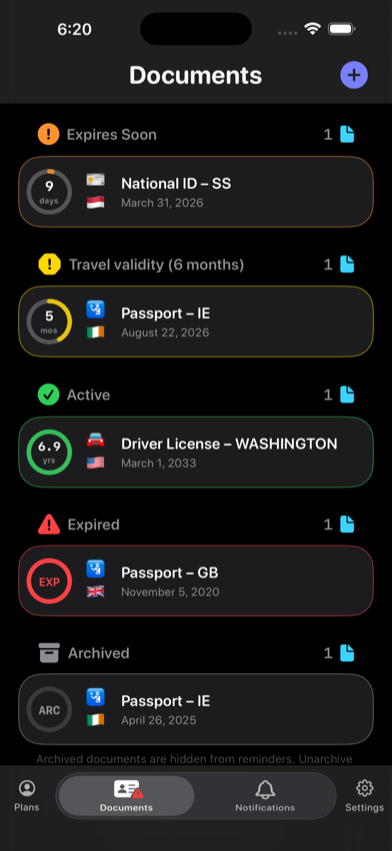
At a glance
Add the passport’s printed expiration date to RenewalKit, verify every recognized field, and schedule reminders early enough for your renewal process and travel plans. Because entry and airline rules vary, confirm current requirements for each destination and transit point instead of relying on one universal “six-month rule.”
A passport date is most useful when it is paired with time to respond. RenewalKit can keep the date visible and ask iOS to remind you, but it cannot know a government’s current processing time or decide whether a passport is acceptable for a specific trip.
Set it up in RenewalKit
Read the printed expiration date
Use the date on the passport data page as the record’s source. If you also add the issue date, make sure it is not mistaken for the expiration date.
Choose an input path
In Documents, tap Add. Use the camera, choose a photo, select Passport NFC for a supported ePassport, or enter the details manually.
Confirm the suggested record
Set the type to Passport and compare the title, issuer country, issue date, expiration date, printed name, and document number with the physical passport. OCR and MRZ recognition can be wrong.
Choose more than one useful lead time
RenewalKit starts new records with one-month and one-week reminders at 9:00 AM. For a passport, consider adding an earlier reminder based on official renewal processing guidance and known travel, then keep a nearer reminder as a check.
Recheck before travel
Open the record when planning a trip. Compare the passport with current government, embassy or consulate, transit, and airline requirements; update the reminder after renewal.
What to verify
Six months is not a universal rule
Some destinations require passport validity beyond a trip and some airlines enforce those requirements, but the exact period and exemptions vary.
RenewalKit does not calculate government lead time
Processing times, appointment availability, emergency procedures, and eligibility come from the issuing authority and can change.
A reminder is not proof of travel eligibility
The app records dates and schedules local notifications. It does not verify authenticity, blank pages, visa status, damage, or entry permission.
Troubleshooting
The scan picked the wrong date.
Edit the expiration field on the confirmation screen before saving. If the layout is difficult to recognize, use a clear, evenly lit image or enter the date manually.
The app shows “Travel validity (6 months).”
Treat that status as a planning prompt, not a legal decision. Check the rules for the actual itinerary.
No passport alert appeared.
Open RenewalKit reminder settings and iOS Settings to confirm notifications are allowed. Check Focus and Scheduled Summary, confirm the reminder time is still in the future, and review the scheduled reminder list.
Questions
Does RenewalKit keep a photo of my passport?
No scan image is stored as part of the RenewalKit record. A scanned or selected image is processed temporarily; the fields you confirm are what the app saves.
Can I track more than one passport?
Yes, within the active-document capacity of your plan. Give each record a clear title and use Profiles if you have that entitlement and manage passports for more than one person.
Should I always renew six months before expiration?
Not as a universal rule. Start from official issuer processing guidance and the requirements of planned destinations, transit points, and carriers.
Do I need NFC to add a passport?
No. Camera recognition, Photos import, and manual entry are also available. NFC is an optional import path for supported ePassports and devices.
Sources & further reading
- US Department of State — After You Get Your New Passport
Explains that some destinations require validity beyond a trip and directs travelers to destination-specific rules.
- RenewalKit on the App Store
Current product availability and version information.