
No purchase needed
Start free
1active document
Try scanning and reminders with one active document.
Profiles sold separately
Calm expiration reminders for iPhone and iPad
Keep expiration dates for passports, licenses, visas, and more on one clear timeline—for you and the people you help. Set reminders early, so you have time to act.
Start with one active document. No RenewalKit account required.
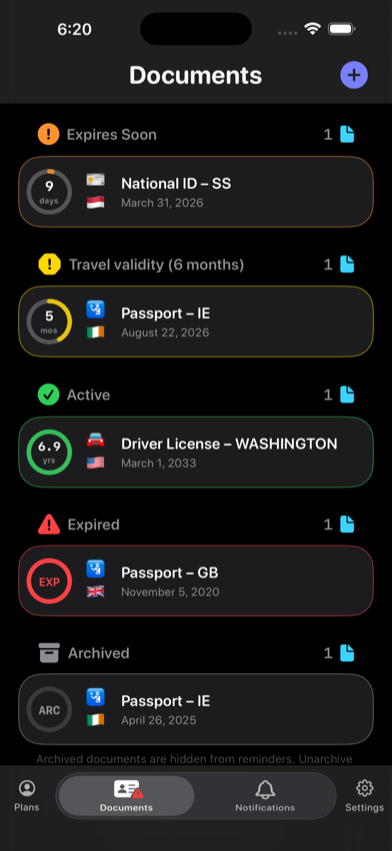
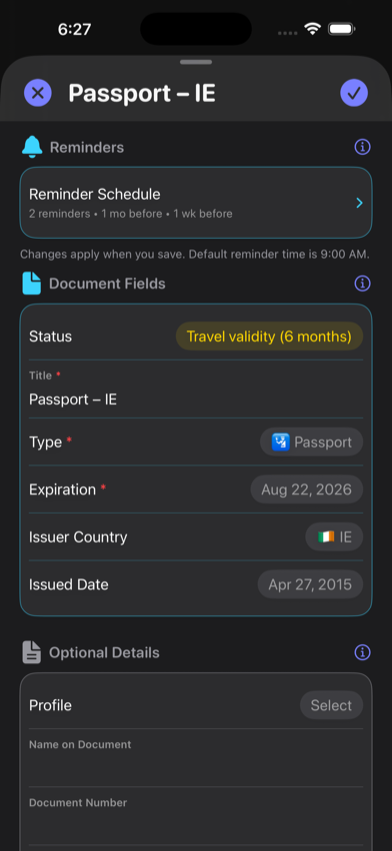
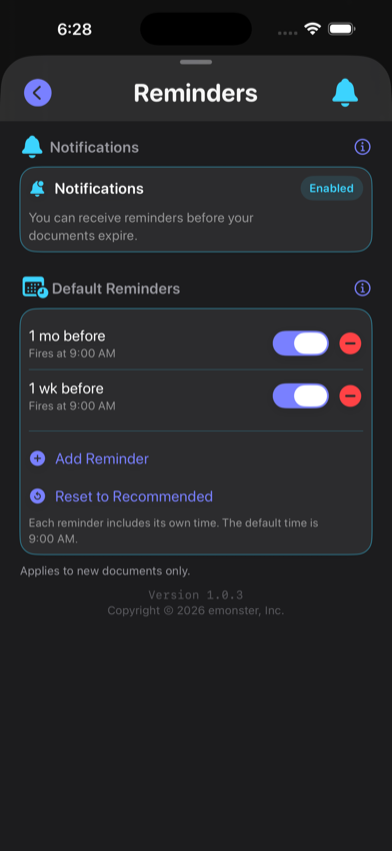
Real app. Real steps.
Add a record. Review the details. Choose your lead time. See what needs attention. These are real RenewalKit screens with sample data.
One clear timeline
From passports to everyday renewals, keep the dates that matter together.
Passports, IDs, and driver’s licenses.
Visas, residence cards, and work permits.
Registration, inspections, and insurance.
Memberships, warranties, and contracts.
Date still ahead
Time to plan
Date has passed
Kept for reference
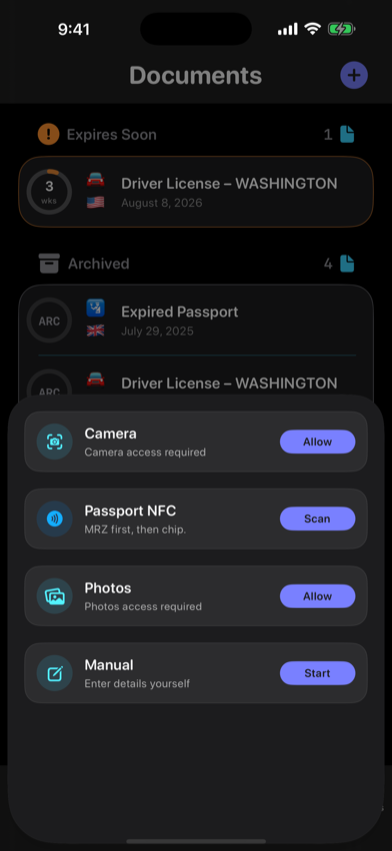
Four ways to begin
A document, a photo, a supported ePassport—or just the details. Choose how you want to add a record.
Use your camera to recognize the details on your device.
Start with a document photo already on your device.
Read a supported ePassport chip with a compatible iPhone.
Type the details yourself. No scan required.
Passport NFC
On a compatible iPhone, RenewalKit can use the machine-readable zone to open a short NFC session, read supported DG1 identity data from a compatible ePassport, and prepare editable reminder details.
Capture the two machine-readable lines on the passport photo page. RenewalKit derives a temporary access key on the device.
Keep the top edge of iPhone against the passport while RenewalKit reads supported DG1 chip data.
Check the suggested name, passport number, nationality, date of birth, sex, and expiration date, then choose what becomes part of the reminder record.
Passport NFC import is a data-entry convenience. It does not certify authenticity, identity, travel eligibility, or current entry rules.
More time to act
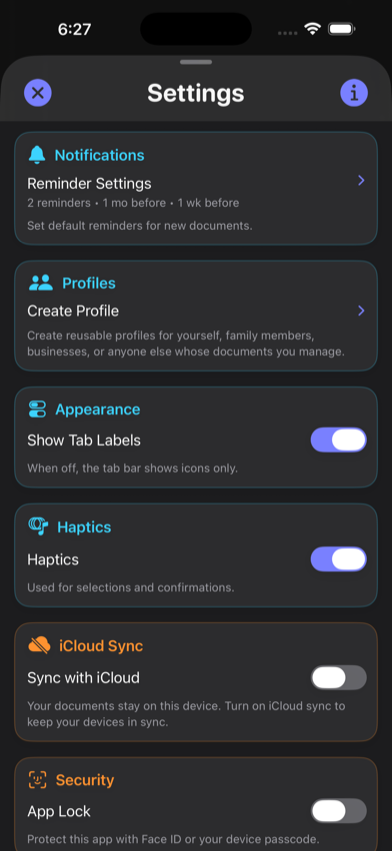
New records start with reminders one month and one week before expiration at 9:00 AM. Keep them, change them, or remove them. After you allow notifications, RenewalKit schedules the requests on your device.
Start the renewal process.
Finish before the deadline.
iOS controls delivery and presentation. Focus, Scheduled Summary, permission changes, and device settings can affect how an alert appears.
For the people you help
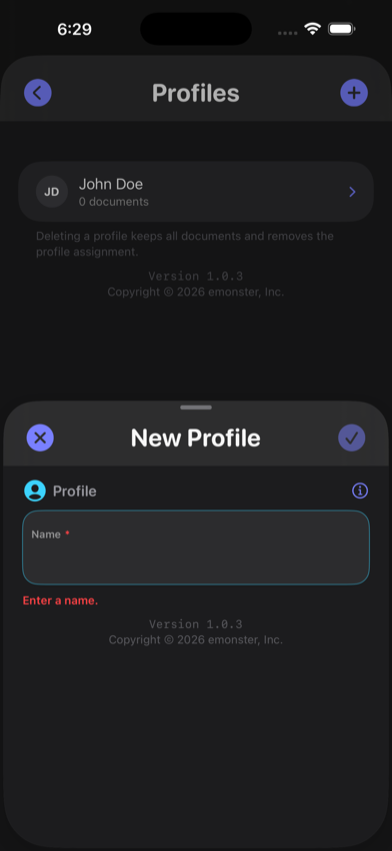
Profiles can group records for you, a partner, children, parents, or anyone whose dates you help track. A profile is an organization label inside RenewalKit—not a shared account.
Profiles is a one-time add-on and is included with lifetime Unlimited or Upgrade to Unlimited. It is not currently bundled by the monthly or yearly subscription entitlement.
Your data, explained
Your scan is temporary. You choose the details that become a saved record.
Text recognition runs on your iPhone. Scan images and raw text are used temporarily.
Review the suggested details, correct anything that needs it, and choose your reminders.
Confirmed fields and reminders are saved locally—not scan images or raw text.
Optional. Off by default.
Face ID, Touch ID, or passcode.
App controls in Settings. Website opt-in.
Scanning and reminders at every capacity
No purchase needed
1active document
Try scanning and reminders with one active document.
Profiles sold separately
One-time purchase
10active documents
More room for the documents you want to keep in view.
Profiles sold separately
One-time purchase
Unlimited active documents
Unlimited capacity, with no recurring subscription.
Profiles included
Monthly or yearly
Unlimited active documents
Unlimited capacity while your subscription is active.
Unlimited MonthlyUnlimited Yearly
Profiles sold separately
Choose in the app. The App Store shows current prices, availability, and purchase terms for your region.

Practical guides
Start with a passport, organize the family, or explore a new way to add a record.
Set a reminder, choose your lead time, and check the rules for your next trip.
Read guideUse Profiles to keep household documents organized by person on your device.
Read guideRead a supported passport with MRZ and NFC, then check the fields before saving.
Read guideQuestions, answered precisely
RenewalKit supports passports, passport cards, driver’s licenses, national IDs, visas, residence and work permits, travel authorizations, vehicle records and insurance, payment-card dates, health and professional records, memberships, subscriptions, contracts, certificates, warranties, and a custom Other type.
RenewalKit schedules notification requests on your device for the lead times and times you choose. You must allow notifications. iOS handles presentation, so Focus, Scheduled Summary, notification settings, and device state can affect when or how an alert appears.
No RenewalKit account is required for the core record, scanning, and local reminder workflow. Apple may require your Apple Account for App Store purchases, restores, or optional iCloud features.
The core local record workflow, on-device text recognition, and already scheduled local notifications can work without a network connection. Purchases and restores, optional iCloud sync, updates and configuration, and optional analytics or diagnostics can require a connection.
Scan images and raw OCR are used temporarily during recognition and confirmation. They are not fields in RenewalKit’s persistent record model, and the app does not save a scan image into its database or Photos library. The record fields you confirm are stored.
Supported RenewalKit records synchronize through Apple CloudKit under your Apple Account. iCloud sync is off by default. Apple encrypts third-party app data in transit and on server; applicable end-to-end protection depends on Apple’s Advanced Data Protection settings.
On a compatible device, RenewalKit first scans the passport’s machine-readable zone to derive a temporary access key, then reads DG1 identity data from a supported ePassport chip and opens the normal confirmation screen. You review the suggested fields before saving.
Current app entitlement code includes Profiles with the standalone Profiles add-on, lifetime Unlimited, and Upgrade to Unlimited. Monthly and yearly Unlimited subscriptions currently provide unlimited document capacity but do not themselves grant Profiles.
Add one record. Check the date. Choose your reminder. Then get back to the rest of your day.
No RenewalKit account required for the core record and reminder workflow.