
Scanning & privacy · 7 min read
What “on-device scanning” means—and what RenewalKit actually saves
See what happens on your iPhone, what is temporary, and what stays in your record.
Your scan, explained.
At a glance
Apple Vision performs RenewalKit text recognition on the device. Camera scans, selected images, raw OCR lines, and confidence data are used temporarily during recognition and confirmation and are not persistent record fields. The title, type, dates, optional identifiers, notes, Profile, and reminder rules you confirm are stored locally and can sync through CloudKit if you enable iCloud.
Privacy copy becomes misleading when it treats a scan and a saved reminder as the same thing. RenewalKit intentionally separates them: the image helps propose a record, and the confirmed record is what remains.
Set it up in RenewalKit
Choose the source
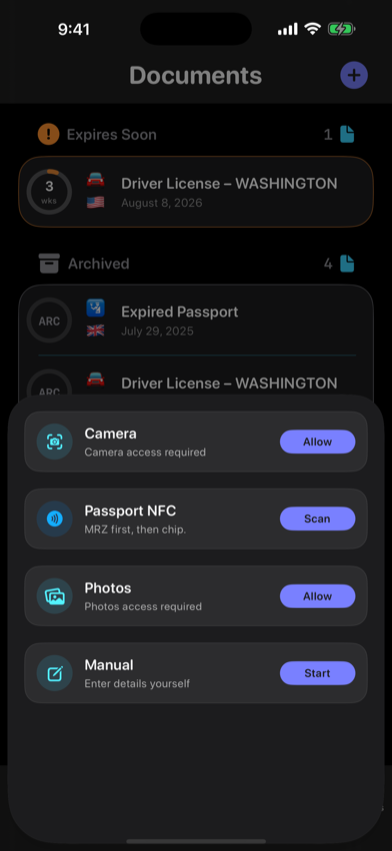
Use Apple’s document camera, select a photo, choose Passport NFC for a supported ePassport, or bypass recognition with manual entry.
Let Vision recognize text locally
RenewalKit normalizes the in-memory image, detects barcodes when present, runs Apple Vision OCR, and applies MRZ and field-extraction heuristics on the device.
Inspect the confirmation screen
Recognition produces suggestions, not facts. Correct the title, type, issuer, issue and expiration dates, printed name, document number, Profile, notes, and reminder schedule.
Understand the saved boundary
The confirmed fields become a SwiftData record. The original scan image, raw OCR document, confidence values, and transient passport access material are not properties of that record.
Choose optional network features deliberately
Local storage is the default. Turn on iCloud only if you want supported records in CloudKit, and use the in-app Anonymous Analytics setting to control future app telemetry.
What to verify
Privacy obligations vary by jurisdiction
Rules and organizational policies for handling personal or document details can differ by country, state or province, and context. RenewalKit’s on-device workflow does not determine compliance; enter only information you are permitted to manage.
A scanned image is captured in memory
Do not interpret “not retained” as “never captured.” VisionKit returns scanned page images for temporary processing; RenewalKit does not write them into its database or Photos library.
Confirmed data persists
Names, document numbers, dates, notes, Profile labels, and reminder schedules are stored if you choose to save them.
On-device does not mean the whole app is offline
StoreKit, optional iCloud, updates and configuration, and optional analytics or diagnostics can use network services.
Troubleshooting
Recognition finds no text.
Use even lighting, avoid blur and glare, include the full document, or enter details manually. Recognition quality varies by layout and language.
A sensitive field was suggested.
Remove any optional field you do not want to store before saving. You can also use manual entry with only the minimum fields needed for a reminder.
I enabled iCloud by mistake.
Turn off iCloud sync in RenewalKit Settings. Consult Apple’s iCloud controls for data already processed in CloudKit; do not assume a local toggle retroactively erases every cloud copy.
Questions
Does Apple Vision recognition run on the device?
Yes. Apple documents Vision text recognition as on-device processing.
Is the scan image stored in RenewalKit?
It is used temporarily in memory but is not a persistent field in the RenewalKit database and is not written to Photos by the document scanner.
Is raw OCR text stored?
Raw OCR and spatial recognition results are temporary scan-result data, not fields in the persistent record model.
What does remain after I tap Save?
The record fields and reminder rules you confirmed remain in local storage, with optional CloudKit sync if enabled.
Sources & further reading
- Apple — Recognizing Text in Images
Apple states Vision text-recognition processing happens on the user’s device.
- Apple — iCloud data security overview
Encryption and Advanced Data Protection boundaries for third-party app data.