Driver’s licenses · 5 min read
Set a driver’s-license renewal reminder before the deadline gets close
Give yourself time to check the requirements and arrange your next renewal.
Make time to renew.
At a glance
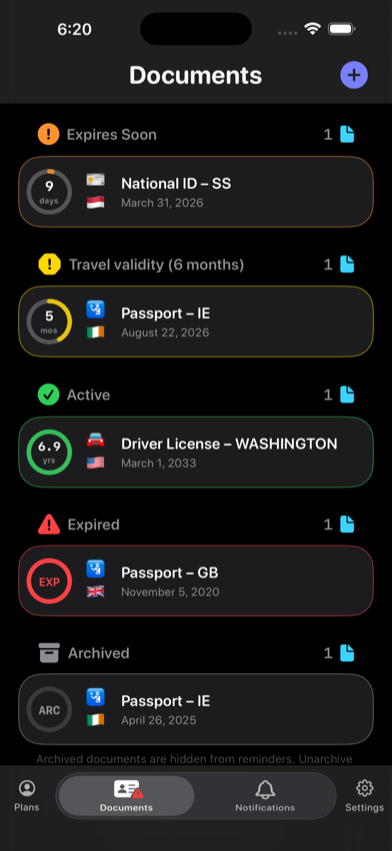
Add the license’s printed expiration date as a Driver’s License record, identify the issuing jurisdiction in the title, and schedule reminders based on the licensing authority’s renewal window. RenewalKit does not renew a license, test eligibility, or know whether an in-person visit, exam, photo, fee, or document is required.
License renewal rules vary by jurisdiction and can change with age, license class, driving history, or residence. The app is the timeline; the issuer is the rulebook.
Set it up in RenewalKit
Check the front and back
Find the exact expiration date and confirm that it belongs to the license rather than a class, restriction, or temporary credential.
Add a Driver’s License record
Use camera recognition, Photos, or manual entry. Put the state, province, prefecture, or country in the title when that helps distinguish records.
Verify the scanned fields
Correct the date and issuer before saving. Add a document number only if you want it in local storage and understand that it may sync through iCloud when sync is enabled.
Match reminders to the official window
Look up when renewal opens and whether appointments or mailed documents add time. Choose an early reminder for preparation and a nearer reminder for follow-through.
Update after renewal
Replace the expiration date with the new official date or archive the prior record and create a new one if you want a clean history.
What to verify
The issuer sets the rules
Online eligibility, grace periods, driving privileges, fees, tests, and required identity documents are outside RenewalKit.
Expired does not have one universal meaning
Do not assume a grace period allows driving. Follow the licensing authority and applicable law.
Protect optional reference fields
A license number and printed name are optional. If entered, they become part of the saved local record and optional iCloud sync.
Troubleshooting
The scanner recognizes the birth date instead.
Edit the expiration date before saving. A clean crop and even lighting can help, but manual entry is always available.
My jurisdiction changed the renewal date.
Update the record from the official notice and rebuild the reminder schedule by saving the change.
The reminder time has passed.
Past triggers are not scheduled. Add a future rule or act on the renewal now, then update the record after the new license is issued.
Questions
Can RenewalKit renew my driver’s license?
No. It only records the date and schedules reminders.
Does RenewalKit know my state or country’s renewal rules?
No. Use the official licensing authority for current eligibility, fees, tests, appointments, and grace-period information.
Do I have to save my license number?
No. The document-number field is optional.
Can I track licenses for several people?
Yes, within your plan capacity. Profiles can group them by person when that entitlement is available.
Sources & further reading
- Apple — Asking Permission to Use Notifications
Notification permission and settings behavior.
- RenewalKit on the App Store
Current app availability and compatibility.